Select Upgrades
Info
This is where you can choose what house components will be upgraded. Initially, only one upgrade is applied at a time,
but combinations
are also supported
Ceilings
- These options will affect all ceilings in their respective categories.
- All Ceilings: To change ALL Ceilings in the house file, select one or several of the options to compare against the base house.
- Attic or Scissor: If you are looking for more granular control and only want to change Attic or Scissor Truss ceilings, select one or several of the options to compare against the base house. This will change ALL Attic and Scissor ceilings.
- Flat or Cathedral: If you are looking for more granular control and only want to change Flat or Cathedral ceilings, select one or several of the options to compare against the base house. This will change all Flat and Cathedral ceilings.
Walls
- These options will change all above grade wall elements in the file.
- You can choose from either an Effective R-Value or from the list of predetermined Wall assemblies.
- Custom Code Libarary options can be used.
Windows
- To change all windows you may choose from a predetermined list of double and triple pane windows and their associated specs.
- Custom Code Libarary options can be used.
Slab on Grade
- These options will affect all slab on grades in the house file if you have multiple slab on grade foundation elements.
- You may choose from a range of effective R-values for the slab to compare against the base house.
- You may choose from a range of effective R-values with either fully insulated (SCB_29) or perimeter insulated (SCB_17) types to compare against the base house.
- Custom Code Libarary options can be used.
Crawlspace
- These options will affect all crawlspaces in the house file if you have multiple crawlspace foundation elements.
- You may choose from a range of effective R-values or wall assemblies for the crawls to compare against the base house.
- You may choose from a range of effective R-values with either fully insulated (SCB_29) or perimeter insulated (SCB_17) slab types for crawlspace floors to compare against the base house.
- Custom Code Libarary options can be used.
Basement
- These options will affect all basements in the house file if you have multiple basement foundation elements.
- Pony Walls: You may choose from a range of effective R-values or wall assemblies for the pony walls to compare against the base house.
- It is typical construction practice to match these to your above grade wall assemblies.
- Foundation Walls: You may choose from a range of effective R-values or wall assemblies for the foundation walls to compare against the base house.
- Floor Insulation: You may choose from a range of effective R-values or wall assemblies for the basement slabs to compare against the base house.
- Custom Code Libarary options can be used.
Ventilation
- Air Exchange: You may choose from a range air exchange options to change performance or compare against the base house.
- Heat Recovery: You may choose from a range of HRV options to compare against the base house.
Heating and Cooling
- With Cooling: You may choose from a range electric heating options with cooling compare against the base house.
- ASHP means Air Source Heat Pump.
- Adding cooling currently gives you extra room in your MEUI.
- Without Cooling: You may choose from a range of gas or electric heating options to compare against the base house.
- Custom Code Libarary options can be used.
Hot Water
- Hot Water Systems: You may choose from a range electric and gas DHW options to compare against the base house.
- Drain Water Heat Recovery: You may choose from a range of DWHR options to compare against the base house.
- Custom Code Libarary options can be used.
Proposed Upgrades
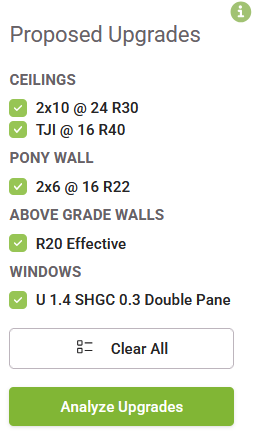
- Once you select upgrades that haven't been ran before, "Proposed Upgrades" will appear on the right.
- Unchecking the box beside the upgrade will remove the item from the list.
- Pressing the "Analyze Upgrades" button will calculate the results relative to your base house and add the items to your Available Upgrades.
- Pressing the "Analyze Upgrades button will display a loading bar that will progress as your file processes.