Projects
- Each Project is a grouping of Hot2000 files.
- Houses can be a part of multiple Projects.
- Uploading a house to "All Houses" will result in the house having no Project association.
- Adding a house to Base Houses from the Results page will automatically add the house into the selected Project.
- Projects allow you to upload and organize your houses.
Create New Project
- Users must be a part of a Company to create Projects.
- Projects can be accessed by both Users and Admins of a Company.
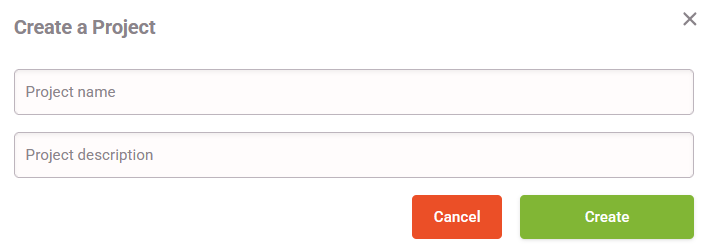
- Click "Create Project".
- Add a Project Name.
- Project Names are not required to be unique.
- Adding a short decription can help with differentiating Projects from each other.
- Click "Create" to create your Project.
- The Project will now appear in your list of Projects.
- Search the house in "All Houses" or select the Project with the house in it and select it from the list.
- Select the Project you would like to upload your house to.
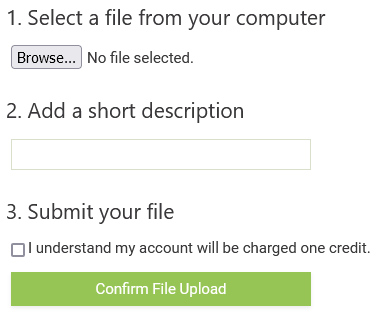
- Click "Add a New File" button under Project Houses.
- Uploading a house to the "All Houses" Project will result in the house having no Project association.
- Even if a house is uploaded to a user defined Project it will be available in the "All Houses" Project.
- Select a Hot2000 house file from your computer.
- Adding a short decription can help with differentiating houses from each other. Noting base houses helps with file distinction and organization as you can save simulations from the Results page after exploring different combinations.
- Once you click "Upload" a loading icon will appear.
- HEET will confirm when the housegit has been uploaded.
- If a Project is selected, the house will automatically be added to that Project.
- If "All Houses" is selected, the house will have no Project associated with it.
- Select a Project.
- Select or search the house you would like to add to the project.
- Click on the house to add it to the project.
- Select a Project.
- Click "Remove" on the house from the Project Houses list.
Select a File
Add a New File
Add Existing File
Remove a File from a Project